

You Can Help!
The archive is always expanding but we need submissions from everyday Apple IIGS users like you to complete it. There are many ways you can help the archive:
Submit box scans
Submit 2image archives
Submit expansion card scans
Submit photographs of external peripherals
Submit screen grabs
Submit music recordings
Submit manual scans
Submit game solves
Written below are some simple steps for submitting any of the above to maximise quality and how to upload the files to the archive. if you have any questions before submitting anything, you can contact me directly here.
SUBMITTING BOX/COVER SCANS



Firstly, check the following list of required box scans needed to complete the archive. We don’t want anyone to waste their time scanning something that’s already available!
Games
Space Shark, Solitaire & Cribbage, Solitaire Volume II, Mad Match and Mighty Marvel/Mighty Nerd.
Applications
Designer Prints, Designer Puzzles, Mercury, Smart Money, Master Tracks Jnr, Prosel, Independence, Life Guard, Hyperlaunch, VirusMD, Beagle Compiler, GSBasic, Lisa816.v5.433, LogoWriter GS.
Educational
Color 'n' Canvas, Storybook Weaver, Mr Py and I, Inner Body Works, InfoLab Chemistry & Life Science, Animal Tracker, Dueling Questions, Volcanoes Deluxe, First Shapes, Super GS Award Maker, Talking Academic Quiz Kid, Computer Video Reader: World of Nature - Reading About Animals, Reading About Sharks, Reading About Reptiles, Reading About Fish, Weather, Global Express Atlas, Kinderama, Math Wizard, Logic Master, Stars and Planets, Creature Chorus, First Categories, First Verbs, First Words, First Words II, Let's Go To The Circus, Simple Sentence Structure, Creature Magic.
Publication Cover Scans
The Complete Apple IIGS Programmer's Guide, Your IIGS Guide.
If you have one or more of the above, here’s the best way to scan and submit them:
1) Set your scanner software settings to default/factory reset.
2) Clean the box from dust. Ensure the surface of your scanner is also clean.
3) Lay the object down flat to the scanner’s glass and try to ensure that the item is straight (Your scanner might have bevelled edges whereby you slot the item up against keeping it at a right angle).
4) Scan the image in at full RGB colour, 100% of original size and at 300dpi. Use a 133dpi de-screen or ‘General’ descreen if your scanner software doesn’t display anything more specific. Do not use unsharp mask or allow the software to auto correct colour and tone.
5) Save as 100% highest quality JPG.
If you're intending to submit more than one scan, archive them together as a .zip file and upload that single file. Please be patient after pressing the submit button; as an example, it may take 2 or 3 minutes to upload 5 megabytes of data. Upon successful completion of the upload, the site will give you a 'Thank You' message for confirmation.
6) Submit Scan
Additionally, if you have any IIGS promotional materials such as brochures, advertising, etc, you can also employ this method of scanning for best possible quality.
SUBMITTING 2IMAGE ARCHIVES

Although the archive is mostly complete in regards to disk images of Apple IIGS software, there are still a few programs that have eluded collection. These are mostly educational titles and are listed below:Talking Academic Quiz Kid, Computer Video Reader: World of Nature - Reading About Sharks, Bird Watcher, Phonics Fun, Fraction Action, Decimal Dungeon, Percentage Panic, Ghostly Grammar.
Special Needs software by Laureate Learning: Creature Chorus, First Categories, First Verbs, First Words, First Words II, Let's Go To The Circus, Simple Sentence Structure, Creature Magic.
There are also educational hyper/multi-media titles still required too, although they also require a laser disc. Although no form of emulation for the Apple IIGS supports laser disc and the Apple Video Overlay Card (and probably never will), a video capture of the content of the laser discs would be ideal to preserve their content alongside disk images of the actual GS/OS software: GTV: A Geographic Perspective on American History, Science Vision: Astrovision, Science Vision: BioExplorer, Science Vision: Chemical Pursuits, Science Vision: EcoVision, Science Vision: ErgoMotion and Science Vision: TerraVision.
Also, the archive is also keen to include 8-bit educational software available on 3.5" disk, including the following titles: Stickybear Numbers, the Explore-a-Story, Explore-a-Classic and Explore-a-Science series. This list is by no means complete, so if you have titles of 8-bit edu-ware on 3.5" disk, check with the current list of those titles to see if you can contribute (be on the lookout for Davidson, The Learning Company, Learning Ways Inc., Hartley, Sunburst and Weekly Reader/Optimium Resource titles).
There are also some apps for which later versions were released but are not currently included in the archive: The Manager v1.1 (or higher), Transprog III v1.2 (or higher) and Kangaroo v1.4 and higher (all English versions wanted, newer French versions are already held in the archive).
Last but not least, there is currently ONE known 8-bit game on 3.5" disk that could fill a gap in the archive - Centauri Alliance. But write in if you think you've found another!
HOW TO CREATE 2IMAGE ARCHIVES
There are several ways to create 2image archives.
The easiest way is to use the Bernie ][ the Rescue emulator on a PowerMac with a built in floppy drive. Run System 6.0.1 within Bernie, create a new 2image disk image from Bernie’s ‘File’ menu, insert the original disk, and use the emulated Finder to do a disk to disk copy from the physical media to the virtual disk image.
You can also create DiskCopy disk images with 68000 and PowerPC series based Macintosh computers. Simply run DiskCopy 4.2 or 6.0 (version 6.0 came with MacOS 8 and higher), insert the original disk and the program will automatically create a DiskCopy disk image of that floppy disk. DiskCopy 4.2 images can be used with Bernie ][ the Rescue, where they can be converted into 2image disk images.
You can also create 2image archives from original floppy disks on an Apple IIGS, using the either the programs ImageMaker v2.2 ($5 shareware) or Asimov v2.0 (freeware). Using either program, you can insert a floppy disk into your IIGS and it will save it to another disk drive (preferably a hard drive) as a 2image archive. From there, it may be a little tricky getting the newly created 2images from the IIGS to a Mac or PC but solutions to that issue are included in the FAQ.
If you're intending to submit more than one 2image, archive them together as a .zip file and upload that single file. Please be patient after pressing the submit button; it may take 2 or 3 minutes to upload 5 megabytes of data. Upon successful completion of the upload, the site will give you a 'Thank You' message for confirmation.
SUBMIT EXPANSION CARD SCANS



Firstly, check the following list of required expansion card scans needed to complete the archive. We don’t want anyone to waste their time scanning something that’s already available!
RAM Cards
Checkmate Technology MultiRAM GS, On Three, Inc. On-Board, New Concepts NCS-GS RAM.
Sound Cards
Paralax Inc Sound Ace.
If you have one or more of the above, here’s the best way to scan and submit them:
1) Check that your scanner is capable of scanning depth – for example, Canon scanners that employ their LIDE technology (LED Indirect Exposure) are NOT capable of scanning expansion cards – the circuit board will most likely be blurred, while chips that sit up against the scanner’s glass will be in focus. Most older flatbed scanners ARE capable of scanning some depth of objects. If you’re not sure, do a test with a card, and if any area of it is blurry or too dark, don’t persist with it. If you’re still unsure, submit it anyway but let me know of your uncertainty.
2) Set your scanner software settings to default/factory reset.
3) Carefully clean the card from dust, crud and hairs. Ensure the surface of your scanner is also clean.
4) Lay the card down as flat to the glass of the scanner as possible.
5) Scan the image in at full RGB colour, 100% of original size and at 300dpi. Do not use any de-screening or unsharp mask.
6) Save as 100% quality JPG.
If you're intending to submit more than one scan, archive them together as a .zip file and upload that single file. Please be patient after pressing the submit button; as an example, it may take 2 or 3 minutes to upload 5 megabytes of data. Upon successful completion of the upload, the site will give you a 'Thank You' message for confirmation.
SUBMIT PHOTOGRAPHS OF EXTERNAL PERIPHERALS
There is no compiled list of external peripherials yet, however, simply write in and let me know what you have to offer and I’ll let you know whether it’s required or not.
More detailed instructions will come later, but suffice to say that photographs should be taken against a pure white (or as pure white as possible) background and be taken with a tripod. Photos should be taken without a flash, which will require long exposures (hence the need for the tripod).
If you’ve had some photography experience and are willing to spend some time photographing external peripherals, gimme a holler and perhaps we can nut out a standardised way of photographing external peripherals.
Submit Photo of External Peripheral
SUBMIT SCREEN GRABS
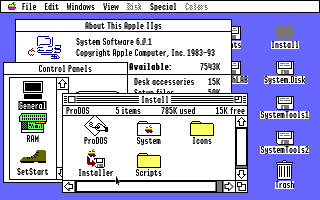
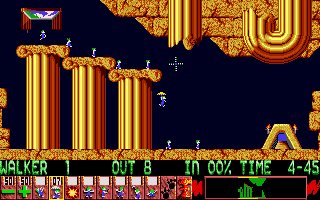
The archive (and the coffee table book on the way) is also requiring a greater range of screen grabs, specifically for these games:
Dungeon Master
Secrets of Bahras, The
Spirit of Excalibur
Tower of Myraglen
War in Middle Earth
Windwalker
Ideally, 20 to 30 screen grabs of a game are wanted – showing the most exciting, varied and colourful compositions of what can happen in game.
Each of these titles within this archive will have the ‘Submit Screen Grabs’ button available for those titles that are a priority for obtaining more screen grabs.
Bernie ][ the Rescue allows you to easily copy what’s currently being emulated to the Mac’s clipboard, where you can paste into image editing software, such as Photoshop or Graphic Converter, evening when running in Mac OS Classic from within OS X.
Although Sweet 16 v2.0 allows a correct aspect ratio display of IIGS video, please turn this option OFF if you creating screen grabs with Sweet 16. It creates anti-aliasing and pixels, which isn’t necessary for the purposes of the archive (although it looks great when using Sweet 16!). Additionally, don’t use any version of Sweet 16 prior to v2.0 for screen grabs – earlier Sweet 16s didn’t properly display a true IIGS colour palette.
It is preferable not to have the Apple IIGS border included with the screen grab.
However you make screen grabs, what’s also very important is how you save them: NEVER SAVE THEM AS JPEGs! Save them as GIF or 8-bit PNG files – these formats might only support limited colour palettes, but that’s perfect for IIGS screen grabs! Also, they use loss-less compression, so you don’t get any nasty compression artefacts that JPG leaves!
When you've got a collection of screen grabs assembled, archive them as a .zip file and upload that single file. Please be patient after pressing the submit button; as an example, it may take 2 or 3 minutes to upload 5 megabytes of data. Upon successful completion of the upload, the site will give you a 'Thank You' message for confirmation.
SUBMIT MUSIC RECORDINGS

Something new to the archive is the recording of music for games and music applications, so anyone can enjoy a nostalgic flashback aurally: much more convenient when at the office!
There are a couple of different ways to record IIGS music. Firstly, you could record from a real IIGS, outputting via the built in headphone jack or preferably, from the stereo enabled headphone jack of an Audio Animator, Sound Meister, Future Sound or Sound Ace, recording either into a PC or Mac. The gain or levels at which you record is important – it should neither be too loud or too soft – the volume peaks should never hit the red part of the VU metre when recording; volume peaks should only ever touch the top of the green.
You can also digitally record music with Sweet 16 or KEGS, WireTap Pro and MacOS X 10.3.9 onwards (don’t record from Bernie when running in Classic – music timing is no longer accurate). WireTap Pro, while shareware, will let you record and save as an AIF without registering, if you don’t use of any of the special features of the program. Please check to see if Sweet 16 or KEGS are providing accurate timing when emulating music, otherwise, it’s preferable to record from a real IIGS.
You could also use Bernie ][ the Rescue (running from OS 8 or 9 ONLY, because audio timing is affected when running in Classic in OS X) for emulation and output the sound from your Mac to another Mac or PC as a recording device. Again, levels are important when recording this way.
If you're intending to submit more than one mp3, archive them together as a .zip file and upload that single file. Please be patient after pressing the submit button; as an example, it may take 2 or 3 minutes to upload 5 megabytes of data. Upon successful completion of the upload, the site will give you a 'Thank You' message for confirmation.
SUBMIT MANUAL SCANS
For some programs, manuals are essential to getting the most out of that one paint program, or truly understanding the rules and objectives of many games.
Most manuals are black and white (or single colour) original print jobs. Following these steps will ensure the best possible quality for black and white (single colour) manual scans. If what you're intending to scan isn't simply black and white, read beyond the steps below.
1) Set your scanner software settings to default/factory reset.
2) Clean the item from dust. Ensure the surface of your scanner is also clean.
3) Lay the item down flat to the scanner's glass and try to ensure that the item is straight (Your scanner might have bevelled edges whereby you slot the item up against keeping it at a right angle).
4) Scan the image in ‘Black and White' or ‘Line Art' or ‘1-bit' (depending on your scanner software) at 100% of original size and at 600dpi. The only setting to check is the threshold setting, which I recommend be set to 90.
5) Save as a TIF using LZW compression or as a PDF using LZW, ZIP, or CCIT Group 4 compression.
If anyone's sceptical about this choice of settings, this is my reasoning:
1) Because this setting makes the scanner complete ignore anything that isn't close to black, it doesn't capture many unwanted elements of a scan that would otherwise require manual retouching, such as the print from the other side of the page, shadows, coffee stains, etc.
2) Although we compensate for 1-bit scans with a 600dpi setting, which is twice the resolution for what would be usually used for a full colour scan, the compression techniques of TIFs and PDFs ensure file sizes are still kept to a minimum - much smaller than grayscale scans and even more so than for colour scans.
3) By having clean text, the OCR techniques that Acrobat employs will work very effectively in black and white and at 600dpi.
4) Printing the PDF document will result in an almost a perfect copy, because no unnecessary anti-aliasing of grayscale scans has been introduced.
If, for example your manual has a full colour title but it's contents are single colour, you can scan the cover and manual contents separately. Acrobat can be used to insert the colour cover into the rest of the document, and yet both 1-bit images and full colour images can exist within the PDF making the most of those formats.
If the entire manual is full colour, then there's no choice but to scan each page in full colour and save as TIF initially so that no awful compression artefacts are left, like JPG leaves.
Hints and Tips: If you have any larger printer/scanner at work, check to see whether it can scan entire loose manuals and both sides of the page when automatically feed into the printer. This will require that any binding be removed, but the digital copy will be worth it and scanning in this way will save a LOT of time by not having to manually turn the page for every spread.
These are the requested manuals to complete this archive's documentation collection:
Space Shark
Bridge 6.0
Mad Match
Solitaire & Cribbage
Cryllan Mission 2088: The Second Scenario
Mighty Marvel Vs the Forces of E.V.I.L.
Spirit of Excalibur
Subversion
Apps:
Calendar Crafter
Smart Money
Softwood GSFile
Your Money Matters
Color Plus
Designer Prints
Designer Puzzles
DYOH: Landscape
Hometown U.S.A.
Mercury
GS Font Editor
HyperLaunch
Independence
Life Guard
When you've got a collection of manuals assembled, archive them as a .zip file and upload that single file. Please be patient after pressing the submit button; as an example, it may take 2 or 3 minutes to upload 5 megabytes of data. Upon successful completion of the upload, the site will give you a 'Thank You' message for confirmation.
SUBMIT GAME SOLVES
You can upload either PDFs or text files of any kind for game solutions or hints and tips.
SUBMIT DISK LABEL SCANS
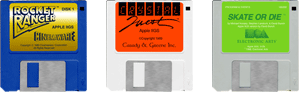
The archive is now collecting scans of disks with original labels, which are retouched in Photoshop and have the potential to be used as an icon set, for interface elements for an emulator and for use in this website and the coffee table book in progress. Check with this list to see if you can help complete this collection:
Games
Cryllan Mission 2088: The Second Scenario, Gold of the Americas, Mad Match, Mighty Marvel Vs the Forces of E.V.I.L., Secrets of Bahras, Solitaire & Cribbage, Spirit of Excalibur, Subversion.
Applications
Beagle Compiler v2.6, Complete Pascal (was TML Pascal), Designer Prints, Designer Puzzles, Dialog Maker, DYOH: Landscape, Hometown U.S.A., Hyperlaunch, Life Guard, Lisa816.v5.433, LogoWriter GS, Mercury, Prism, RADE, Smart Money, Super Basic, VirusMD.
Educational
Adventures of Sinbad, Aesop's Fables, Animal Kingdom, Animal Tracker, Arabian Nights, Bird Watcher, Charlie Brown's ABCs, Color 'n' Canvas, Designasaurus, Dueling Questions, Formulate, Global Express Atlas, Grizzly Bears, InfoLab Chemistry, InfoLab Life Science, Inner Body Works, Kinderama, Learning Spoken English, Logic Master, Math Wizard, Mr Py and I, Playwrite: The Talking Puppets, Read & Rhyme, Reading About Series, Snoopy's Reading Machine, Stars and Planets, Storybook Weaver, Super Award Maker, Talking Academic Quiz Kid, Talking Dinosaurs, Talking USA Map, Volcanoes Deluxe, Weather, Whales, Word Master, World Disk.
1) Set scanner software settings to default/factory reset.
2) Clean the disk(s) from all crud. Ideally, scanner surface should also be clean.
3) Lay the disk(s) as straight as you can against the corners of the glass. Include as many disks as you can fit to save time scanning them in batches rather than as individual disks.
4) Scan at full RGB colour, 100% of original size at 600dpi. You don't need to specify any other settings.
5) Save as 100% highest quality JPG or a TIF with LZW compression.
If you're intending to submit more than one scan, archive them together as a .zip file and upload that single file. Please be patient after pressing the submit button; as an example, it may take 2 or 3 minutes to upload 5 megabytes of data. Upon successful completion of the upload, the site will give you a 'Thank You' message for confirmation.
6) Submit Scan